


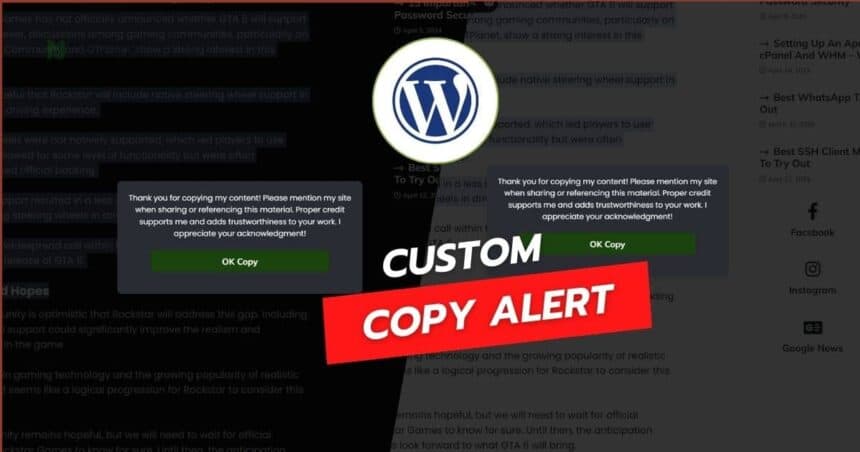
In most cases, as creative individuals, we want to protect our originality from those who merely copy others’ efforts and mislead their audience.
It’s frustrating when someone takes your hard work and tries to pass it off as their own, especially when it involves low-competitive keywords to outsmart your content.
However, they forget that search engines like Google value originality, experience, and the ability to help the search community.
I’ve encountered this issue many times and realized the importance of safeguarding my content. This guide isn’t for beginners; it’s for those who are comfortable with advanced setups using the WordPress functions.php area.
I’ll provide a comprehensive code snippet for functions.php and, for those who want to customize further, I’ll include the CSS and JavaScript separately.
We understand that not allowing copy or right-click functions can be frustrating for users and often leads to a poor user experience.
Instead, using a custom popup can be a more user-friendly solution if you are concerned about your original content not being credited and you want to acknowledge visitors who aim to copy your content.
First, let’s understand how the functions.php code works in your WordPress setup and why it’s essential for your site.
How Does functions.php Code in WordPress Work?
The functions.php file in your WordPress theme acts like a plugin and allows you to add custom functionality to your site. It’s a powerful tool that can be used to enhance your site’s features without altering the core WordPress files. This makes it ideal for adding a custom copy alert script.
This script will be compatible with any theme you are using, whether it’s a custom-built theme or one purchased from any provider. If you encounter any issues, feel free to comment, and I’ll do my best to help you out.
Before we start with the code, make sure you have basic knowledge of HTML, CSS, and JavaScript, and access to your WordPress site’s functions.php file. I assume you are comfortable making advanced modifications to your site’s code.
Adding the Custom Copy Alert Script
To begin, we’ll add the necessary CSS for styling the modal popup, followed by the JavaScript for handling the copy events. Finally, we’ll integrate everything into your WordPress functions.php file.
By the end of this guide, you’ll have a robust system in place to protect your content and ensure proper credit is given when it’s shared. Let’s get started.
Step 1: Access Your Theme’s functions.php File
Log in to your WordPress admin dashboard.
Navigate to the left-hand sidebar and hover over “Appearance.”
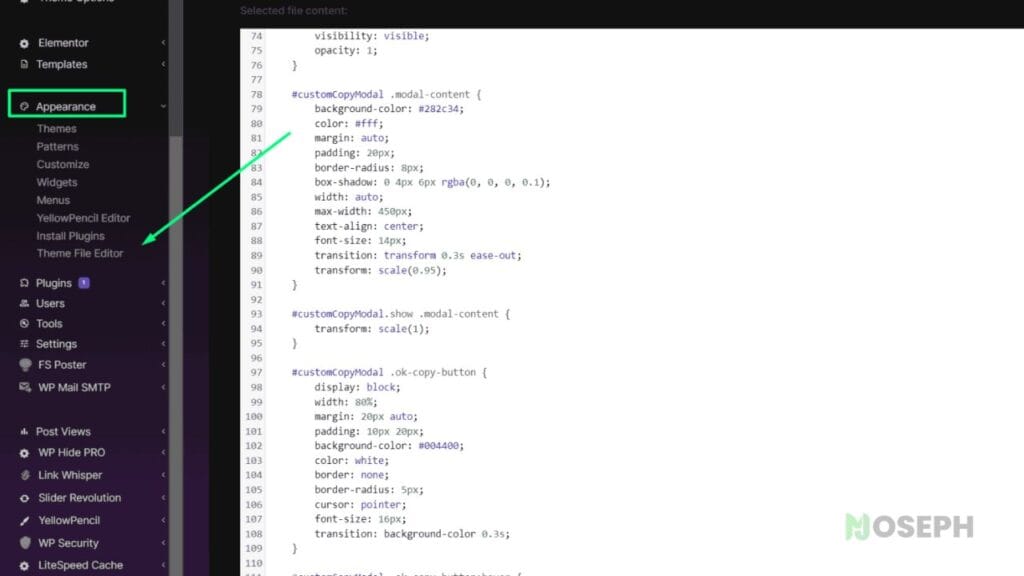
Click on “Theme File Editor.”
In the Theme File Editor, you’ll see a list of theme files on the right side. Make sure the correct theme is selected in the dropdown at the top right if you have multiple themes installed.
In the list of theme files, find and click on functions.php. This is where we will add our custom code.
Step 2: Add the Combined Code to functions.php
Add the following code to your functions.php file. This code includes both the CSS for styling the modal popup and the JavaScript for handling the copy events.
function add_jmatino_copy_alert_script() {
    ?>
    <style>
    #josephmatino-com-Copyscript {
        position: fixed;
        left: 0;
        top: 0;
        width: 100%;
        height: 100%;
        background-color: rgba(0, 0, 0, 0.8);
        display: flex;
        align-items: center;
        justify-content: center;
        z-index: 1050;
        visibility: hidden;
        opacity: 0;
        transition: opacity 0.4s ease-in-out;
    }
    #josephmatino-com-Copyscript.show {
        visibility: visible;
        opacity: 1;
    }
    #josephmatino-com-Copyscript .modal-content {
        background-color: #282c34;
        color: #fff;
        margin: auto;
        padding: 20px;
        border-radius: 8px;
        box-shadow: 0 4px 6px rgba(0, 0, 0, 0.1);
        width: auto;
        max-width: 450px;
        text-align: center;
        font-size: 14px;
        transition: transform 0.3s ease-out;
        transform: scale(0.95);
        position: relative;
    }
    #josephmatino-com-Copyscript.show .modal-content {
        transform: scale(1);
    }
    #josephmatino-com-Copyscript .ok-copy-button {
        display: block;
        width: 80%;
        margin: 20px auto;
        padding: 10px 20px;
        background-color: #004400;
        color: white;
        border: none;
        border-radius: 5px;
        cursor: pointer;
        font-size: 16px;
        transition: background-color 0.3s;
    }
    #josephmatino-com-Copyscript .ok-copy-button:hover {
        background-color: #006600;
    }
    .highlight-backlink {
        font-weight: bold;
        color: #4CAF50;
    }
    .script-author-credit {
        position: absolute;
        bottom: 5px;
        left: 50%;
        transform: translateX(-50%);
        font-size: 8px;
        color: rgba(0, 255, 0, 0.3); /* Green color with 30% opacity */
        display: block;
    }
    .hide-dev-credit .script-author-credit {
        display: none !important;
    }
    </style>
    <script>
    document.addEventListener('DOMContentLoaded', function () {
        var copyCount = 0;
        var contentArea = document.querySelector('.entry-content');
        var selectedText = '';
        if (contentArea) {
            contentArea.addEventListener('copy', function(event) {
                selectedText = window.getSelection().toString().trim();
                var parentElement = window.getSelection().anchorNode.parentElement;
                while (parentElement != null && !parentElement.classList.contains('wp-block-kevinbatdorf-code-block-pro')) {
                    parentElement = parentElement.parentElement;
                }
                if (parentElement != null) {
                    return;
                }
                copyCount++;
                if (copyCount % 2 !== 0) {
                    event.preventDefault();
                    var modal = document.createElement('div');
                    modal.id = 'josephmatino-com-Copyscript';
                    modal.className = 'show';
                    modal.style.visibility = 'visible';
                    modal.innerHTML = '<div class="modal-content"><p>Thank you for copying our content! Please mention our site when sharing or referencing this material. Proper credit supports us and adds trustworthiness to your work. We appreciate your acknowledgment!</p><span class="script-author-credit"><a href="https://matino.io/" style="color: rgba(0, 255, 0, 0.3);" rel="dofollow">Made by Joseph Matino</a></span><button class="ok-copy-button">OK Copy</button></div>';
                    document.body.appendChild(modal);
                    document.querySelector('.ok-copy-button').onclick = function() {
                        navigator.clipboard.writeText(selectedText).then(() => {
                            modal.parentNode.removeChild(modal);
                        });
                    };
                    modal.addEventListener('click', function(event) {
                        if (event.target === modal) {
                            modal.parentNode.removeChild(modal);
                        }
                    });
                } else {
                    event.preventDefault();
                }
            });
        }
    });
    </script>
    <?php
}
add_action('wp_footer', 'add_jmatino_copy_alert_script');
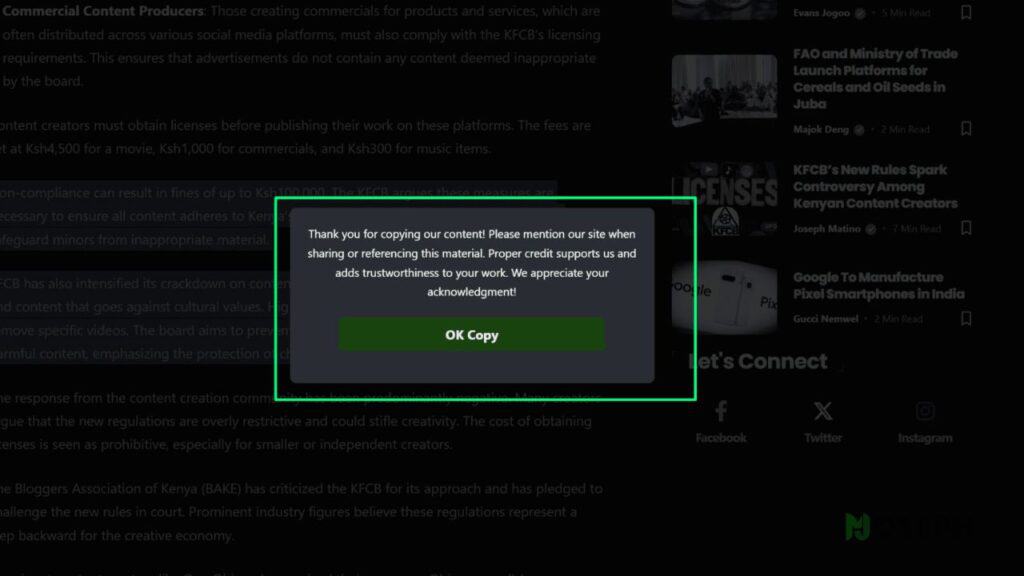
The above script adds a custom copy alert popup to your WordPress site, providing a gentle reminder to credit the source when copying content.
What The Above JavaScript Does
The JavaScript code provided above creates a modal popup that appears when a user copies content from your WordPress site. Here’s a detailed explanation to help you understand its functionality and customization options:
- Functionality: The script monitors copy events within the content area of your posts.
- Target Element: It specifically targets the
.entry-contentclass, ensuring compatibility with most WordPress themes. This is usually the class used for the main content area of posts. - Trigger Frequency: The modal popup appears on the first copy attempt and every second attempt thereafter. This design balances user experience with content protection.
- Scope: The script is designed to work primarily with paragraph elements, which means it will function on posts but not on static pages. This helps keep the focus on your main content.
Customization Options
The script includes a visible credit link with the class script-author-credit, which acknowledges the source of the script. If you prefer to hide it, you can use the provided class in your custom CSS. However, if this script has been helpful to you, I encourage you to leave the credit visible as a sign of appreciation.
Modal Appearance:
The modal uses the class #josephmatino-com-Copyscript for styling. You can customize the look and feel by modifying the CSS rules associated with this class.
The button within the modal uses the class .ok-copy-button. You can change its style to match your site’s design.
Example CSS Customization
If you want to change the appearance of the modal popup or button, here’s a brief guide:
- Modal Background Color
#josephmatino-com-Copyscript .modal-content {
    background-color: #yourcolor;
}
- Button Color:
.ok-copy-button {
    background-color: #yourcolor;
}
.ok-copy-button:hover {
    background-color: #yourhovercolor;
}
#Optional
If you need custom styles and prefer to use your custom CSS area instead of combining it in functions.php, you can separate the CSS and JavaScript. Below are the CSS and JavaScript snippets that you can use.
Custom CSS Only
Add the following CSS to your custom CSS area or your theme’s style.css file:
#josephmatino-com-Copyscript {
    position: fixed;
    left: 0;
    top: 0;
    width: 100%;
    height: 100%;
    background-color: rgba(0, 0, 0, 0.8);
    display: flex;
    align-items: center;
    justify-content: center;
    z-index: 1050;
    visibility: hidden;
    opacity: 0;
    transition: opacity 0.4s ease-in-out;
}
#josephmatino-com-Copyscript.show {
    visibility: visible;
    opacity: 1;
}
#josephmatino-com-Copyscript .modal-content {
    background-color: #282c34;
    color: #fff;
    margin: auto;
    padding: 20px;
    border-radius: 8px;
    box-shadow: 0 4px 6px rgba(0, 0, 0, 0.1);
    width: auto;
    max-width: 450px;
    text-align: center;
    font-size: 14px;
    transition: transform 0.3s ease-out;
    transform: scale(0.95);
    position: relative;
}
#josephmatino-com-Copyscript.show .modal-content {
    transform: scale(1);
}
#josephmatino-com-Copyscript .ok-copy-button {
    display: block;
    width: 80%;
    margin: 20px auto;
    padding: 10px 20px;
    background-color: #004400;
    color: white;
    border: none;
    border-radius: 5px;
    cursor: pointer;
    font-size: 16px;
    transition: background-color 0.3s;
}
#josephmatino-com-Copyscript .ok-copy-button:hover {
    background-color: #006600;
}
.highlight-backlink {
    font-weight: bold;
    color: #4CAF50;
}
.script-author-credit {
    position: absolute;
    bottom: 5px;
    left: 50%;
    transform: translateX(-50%);
    font-size: 8px;
    color: rgba(0, 255, 0, 0.3); /* Green color with 30% opacity */
    display: block;
}
Custom Javascript Only
Add the following JavaScript to your custom JavaScript area or your theme’s scripts.js file. Ensure this script is loaded on your WordPress site, typically in the footer.
document.addEventListener('DOMContentLoaded', function () {
    var copyCount = 0;
    var contentArea = document.querySelector('.entry-content');
    var selectedText = '';
    if (contentArea) {
        contentArea.addEventListener('copy', function(event) {
            selectedText = window.getSelection().toString().trim();
            var parentElement = window.getSelection().anchorNode.parentElement;
            while (parentElement != null && !parentElement.classList.contains('wp-block-kevinbatdorf-code-block-pro')) {
                parentElement = parentElement.parentElement;
            }
            if (parentElement != null) {
                return;
            }
            copyCount++;
            if (copyCount % 2 !== 0) {
                event.preventDefault();
                var modal = document.createElement('div');
                modal.id = 'josephmatino-com-Copyscript';
                modal.className = 'show';
                modal.style.visibility = 'visible';
                modal.innerHTML = '<div class="modal-content"><p>Thank you for copying our content! Please mention our site when sharing or referencing this material. Proper credit supports us and adds trustworthiness to your work. We appreciate your acknowledgment!</p><span class="script-author-credit"><a href="https://matino.io/" style="color: rgba(0, 255, 0, 0.3);" rel="dofollow">Made by Joseph Matino</a></span><button class="ok-copy-button">OK Copy</button></div>';
                document.body.appendChild(modal);
                document.querySelector('.ok-copy-button').onclick = function() {
                    navigator.clipboard.writeText(selectedText).then(() => {
                        modal.parentNode.removeChild(modal);
                    });
                };
                modal.addEventListener('click', function(event) {
                    if (event.target === modal) {
                        modal.parentNode.removeChild(modal);
                    }
                });
            } else {
                event.preventDefault();
            }
        });
    }
});
Functions.php With JavaScript Only
If you prefer to include the JavaScript in your functions.php file, you can use the following code:
function add_jmatino_copy_alert_script() {
    ?>
    <script>
    document.addEventListener('DOMContentLoaded', function () {
        var copyCount = 0;
        var contentArea = document.querySelector('.entry-content');
        var selectedText = '';
        if (contentArea) {
            contentArea.addEventListener('copy', function(event) {
                selectedText = window.getSelection().toString().trim();
                var parentElement = window.getSelection().anchorNode.parentElement;
                while (parentElement != null && !parentElement.classList.contains('wp-block-kevinbatdorf-code-block-pro')) {
                    parentElement = parentElement.parentElement;
                }
                if (parentElement != null) {
                    return;
                }
                copyCount++;
                if (copyCount % 2 !== 0) {
                    event.preventDefault();
                    var modal = document.createElement('div');
                    modal.id = 'josephmatino-com-Copyscript';
                    modal.className = 'show';
                    modal.style.visibility = 'visible';
                    modal.innerHTML = '<div class="modal-content"><p>Thank you for copying our content! Please mention our site when sharing or referencing this material. Proper credit supports us and adds trustworthiness to your work. We appreciate your acknowledgment!</p><span class="script-author-credit"><a href="https://matino.io/" style="color: rgba(0, 255, 0, 0.3);" rel="dofollow">Made by Joseph Matino</a></span><button class="ok-copy-button">OK Copy</button></div>';
                    document.body.appendChild(modal);
                    document.querySelector('.ok-copy-button').onclick = function() {
                        navigator.clipboard.writeText(selectedText).then(() => {
                            modal.parentNode.removeChild(modal);
                        });
                    };
                    modal.addEventListener('click', function(event) {
                        if (event.target === modal) {
                            modal.parentNode.removeChild(modal);
                        }
                    });
                } else {
                    event.preventDefault();
                }
            });
        }
    });
    </script>
    <?php
}
add_action('wp_footer', 'add_jmatino_copy_alert_script');
Conclusion
Adding a custom copy alert popup to your WordPress site is a user-friendly way to protect your content and remind visitors to credit your work. I spent almost four days working on this code, testing it, and ensuring it will help you.
Leaving the credit is a great choice if it helps you. If you notice any problems, feel free to comment below or contact me for more adjustments. I will be updating this article regularly with any improvements or new tricks, so stay tuned for more updates.